


I get this question a lot:
“How do you calculate the correct lot size in Forex Tester, based on percentage risk?”
Forex Tester is a great piece of software that has helped many traders become consistently profitable. But it kills me that you cannot enter a trade based on percentage risk.
TradingView has this feature for live trading, which I use all the time.
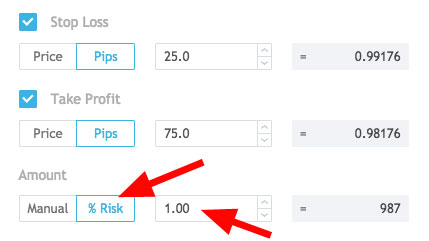

Without a way to accurately calculate the correct lot size, you may make mistakes, which will lead to inaccurate testing results or lost time, when you have to go back and retest the trade.
So if you are having the same frustration, here are two ways that you can easy calculate your lot size in Forex Tester, by using percentage risk. One method is free and takes some time, while the other is paid and instant.
Either way there is something for everyone.
If you prefer the text version, it is provided below the video.
…and yes, this works for both Forex Tester 2 and Forex Tester 3 🙂
How to Calculate Forex Tester Lot Size Based on Percentage Risk Video Tutorial

Roll Your Own Spreadsheet
Traders ask me how to setup a spreadsheet for testing and it's actually quite easy.
Here's how you do it…
First, open your favorite spreadsheet program. If you don't have one, you can sign up for Google Drive for free and you can create your spreadsheet there. It doesn't matter which program you use because the calculations are pretty simple.
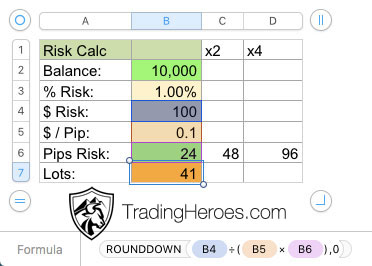
Next, create these row titles:
- Account Balance (entered)
- % Risk (entered)
- $ Risk (calculated)
- $ Per Pip (entered)
- Pips Risk (entered)
- Lots (calculated)
Here's the formula for the $ Risk row:


This is more of a double check to see that the calculation is working correctly and to double check your losses against this risk number.
Here is the lot size calculation:

Spreadsheet Benefits
- Easy to implement
- Free
Spreadsheet Downsides
- Takes time to change settings at the beginning of each test
- You have to flip back and forth between your Forex Tester screen and the spreadsheet
So if you don't want to spend any money, then the spreadsheet is the way to go. However, if you do a lot of testing and you want the most efficient way of calculating your lot size, then you need to have a Forex Tester script.
Use the Snapdragon Forex Tester Lot Size Calculator Script
Using a spreadsheet to calculate lot size is obviously not instant. So it will slow you down.
But this method gives you an instant calculation.
Once you setup this script, you can simply use hotkeys to enter your trades, which speeds things up considerably.
I have setup Control + 1 and Control + 2 as my keyboard shortcuts for short and long trades, respectively.
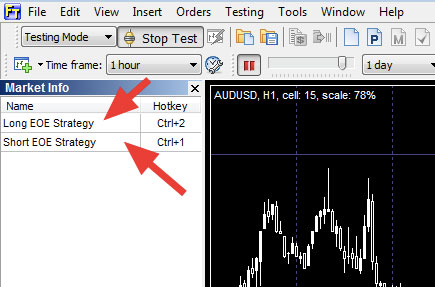


The settings can be changed individually, so you can have different settings for both, if you so choose.
Most of the settings are pretty straightforward, but here are the ones that really make this script worth using:
- Entry Method: You can select Bracket bar (brackets current bar with stop loss and pending entry order) or Use pending order levels (enter a pending order and the script will automatically calculate lot size).
- Risk Definition: You can either risk fixed percent of equity balance or fixed dollar amount per trade.
- Take Profit Type: Set the R multiple of your profit target. For example, if you want to test a 5R profit target, the script will target 5 times your risk as the take profit.
Script Benefits
- Instant lot size calculation and trade execution
- Different settings available, based on your trading method
- Less mental calculations means less decision fatigue and you can usually test longer and more accurately
Script Downsides
- It may not work for all trading strategies, so be sure to learn the details of how it works
- You do have to pay a few bucks to get it
If you value your time and want the fastest possible lot size calculator available, then this script is for you.
Click here to download it.
Conclusion
So there you have it, the two fastest methods that I know of to calculate the correct lot size on your backtesting trades, based on percent risk. Either way, these solutions will speed up your backtesting and allow you to see results faster than having to manually calculate risk on each trade and possibly making a mistake.
If you don't have Forex Tester yet, I would highly recommend it. I have negotiated a discount for Trading Heroes readers, so you can go to this page to get that discount.
Do you know of any other methods to calculate the exact lot size in Forex Tester, based on percentage risk?
Disclaimer: Some links on this page are affiliate links. We do make a commission if you purchase through these links, but it does not cost you anything extra and we only promote products and services that we wholeheartedly believe in. TradingHeroes.com is a participant in the Amazon Services LLC Associates Program, an affiliate advertising program designed to provide a means for sites to earn advertising fees by advertising and linking to Amazon.com.