


A couple of years ago, around this time, I wrote about the desktop version of Trade Interceptor and how it might become a Metatrader desktop replacement.
I was particularly excited because it was finally a decent charting platform that ran on a Mac without additional plugins or ghetto rigging.
But the truth was that it was not ready for prime time yet.
It was still just a java program and did not run native on my Mac.
The interface was terrible, with charts and individual windows strewn all over my desktop.
But there was promise.
A lot of promise. It was a diamond in the rough.
Fast forward to 2014 and they finally decided to release a new version.
This post will give you my Trade Interceptor for Mac review and what I like and don't like about the new update.
Trade Interceptor for Mac Review Video
Now I will take you through exactly what I like and don't like about the software.
On the whole, it is worth using and a huge improvement from the last version.
But there are still some really weird things in the program.
Find out what they are in this video.
If you prefer the text version, it is provided after this video.
What I Like


What I Don't Like
Lost Backtesting
First of all, I noticed that they got rid of the backtesting feature.
Although I didn't try using this feature in the previous version, I'm really hoping that Trade Interceptor can create a better version of the backtester in Metatrader 4.
The thing that is missing from the MT4 is manual backtesting.
Hopefully TI will add it back in future versions and bring it up to par with Forex Tester 2.
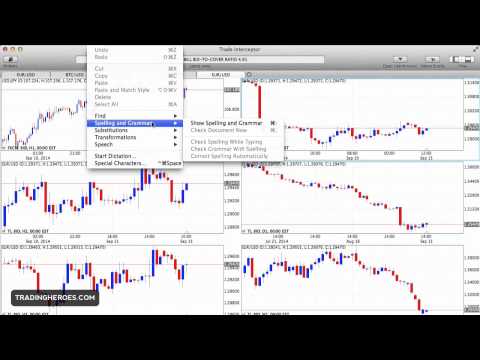
Weird Menu Options
Next, there are some really strange options when it comes to functions that you can select in the menu.
There is even an option to check your spelling and grammar.
I don't know about you, but I don't know the last time that grammar was necessary for placing a trade.
Here is what I mean…


Customizations Don't Save
There are some customizations that you can make to the software that makes it look really slick and easy to use.
For example, you can change the menu bar at the top to only show the views and the news.
But when you exit the program and open it again, the settings go back to the default.
The same goes with showing/hiding the views.
I don't want to keep changing things back every time I open the program.
Being able to save my customizations would make using the software so much more enjoyable.
Conclusion
Even though there are are things that I don't like, they are relatively minor things.
Overall, this is a fantastic second version of Trade Interceptor and you should download it if you are looking for an alternative to Metatrader on the Mac.
Remember when Metatrader first launched?
It was pretty similar…some really great features, but just rough around the edges. I am sure that this will change in time.
I am personally using VMWare Fusion and an old copy of Windows XP to run Metatrader 4 and Forex Tester 2 on my Mac.
But things could change in the near future because I really like where this is going.
As you probably know, I absolutely love the iOS version of Trade Interceptor and it is on my list of must-use iPhone apps.
I also have it on my list of recommended Android apps.
They have versions for the following platforms:
I hope that you found this Trade Interceptor for Mac review helpful and keep an eye out for more software articles.
Disclosure: I do get a commission if you buy through some of the links on this page. But it does NOT cost you anything extra, it helps pay for my hosting costs and a portion of the proceeds go to my charity partner.